test 1
- enable sync: yes
- social.brussels ID: 10438
- nameOfficialNl: AIDE AUX MOINS-VALIDES
- labelNl: Vereniging zonder winstoogmerk (VZW)
- streetNl: Kolonel Bourgstraat
- permanencyNl: 7 dagen op 7 van 9 uur tot 17 uur
- emailNl:
- loiseletmaurice@gmail.com
- contact@amv-asbl.be
- fake field: That Custom Field fake field was not found
Note : the data on the source website social.brussels are only available in two languages : FR and NL. That is why the current demo website is available in FR and NL but not in EN.
{tab FR}
Explications
Préambule : les fiches peuvent bien entendu être mises en forme selon la charte graphique souhaitée. S'agissant d'une démo, il n'y a ici pas de mise en forme.
Ce site de démo permet d'illustrer la synchronisation automatique entre
- des données sur un site tiers disponibles au format json. Exemple :
- social.brussels/rest/organisation/13219 pour la version json
- social.brussels/organisation/13219 pour la version web classique
- et un site Joomla utilisant deux fonctionnalités natives
- le Multilingue
- les Custom Fields
Cette synchronisation se fait à l'aide d'un plugin léger qui se déclenche
- automatiquement, selon l'intervalle configuré dans les paramètres du plugin (typiquement tous les X jours à l'heure indiquée), sans même dépendre d'une tâche CRON
- manuellement lors de la sauvegarde des paramètres du plugin (qu'on les ait changés ou pas)
Plusieurs Custom Fields sont assignés aux articles des Catégories concernées
- un Custom Field "enable sync" où on peut choisir librement si les données dudit article doivent être synchronisées ou pas
- un Custom Field "social.brussels ID" qui indique l'identifiant de l'organisation sur le site de social.brussels
- et tous les Custom Fields
- qu'on souhaite synchroniser avec social.brussels
- ou indépendants
La gestion native du contenu Multilingue de Joomla s'applique aussi aux Custom Fields. Autrement dit
- si une langue est assignée à un Custom Field donné, il n'apparaîtra sur le site que lorsque cette langue est sélectionnée
- sinon, il apparaîtra dans toutes les langues
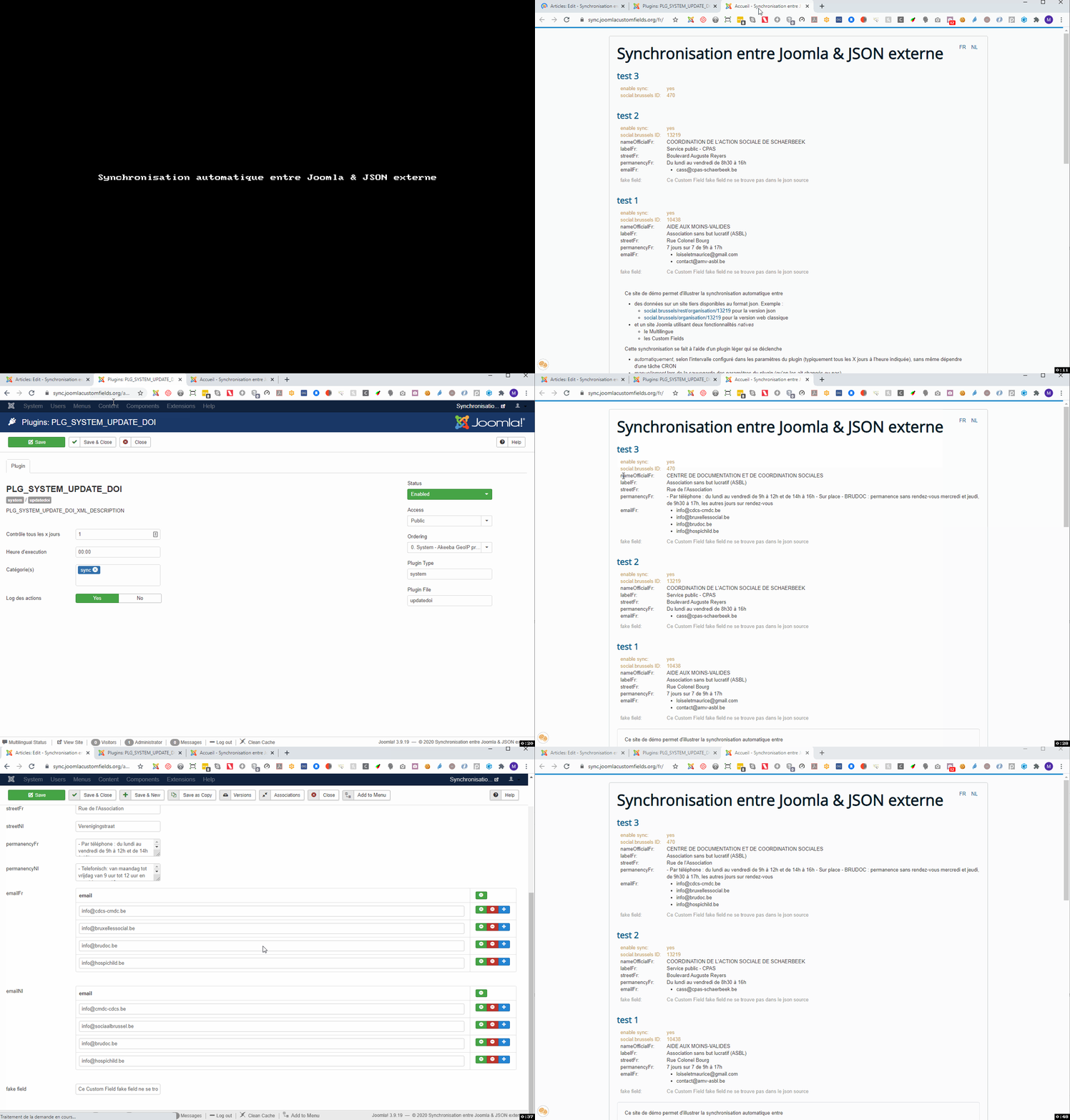
Voici une brève vidéo de démonstration où on voit que
- on crée un article vierge, où on indique uniquement l'ID (identifiant) de l'institution provenant de social.brussels
- on déclenche manuellement la synchronisation (qui par ailleurs se déclenche automatiquement à l'intervalle souhaité)
- on constate tant sur le site (front-end) que dans l'administration (back-end) que la fiche a été entièrement complétée automatiquement
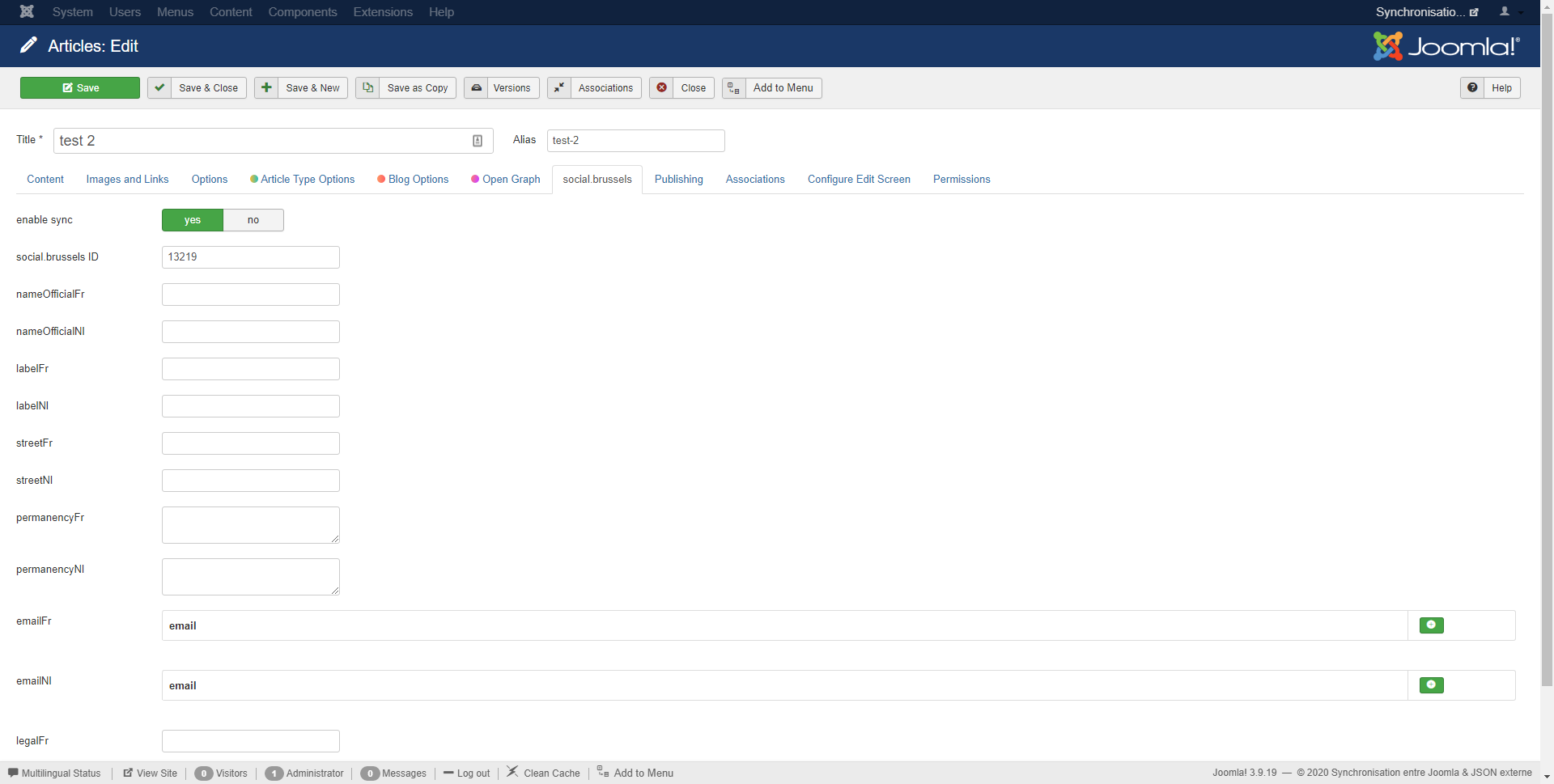
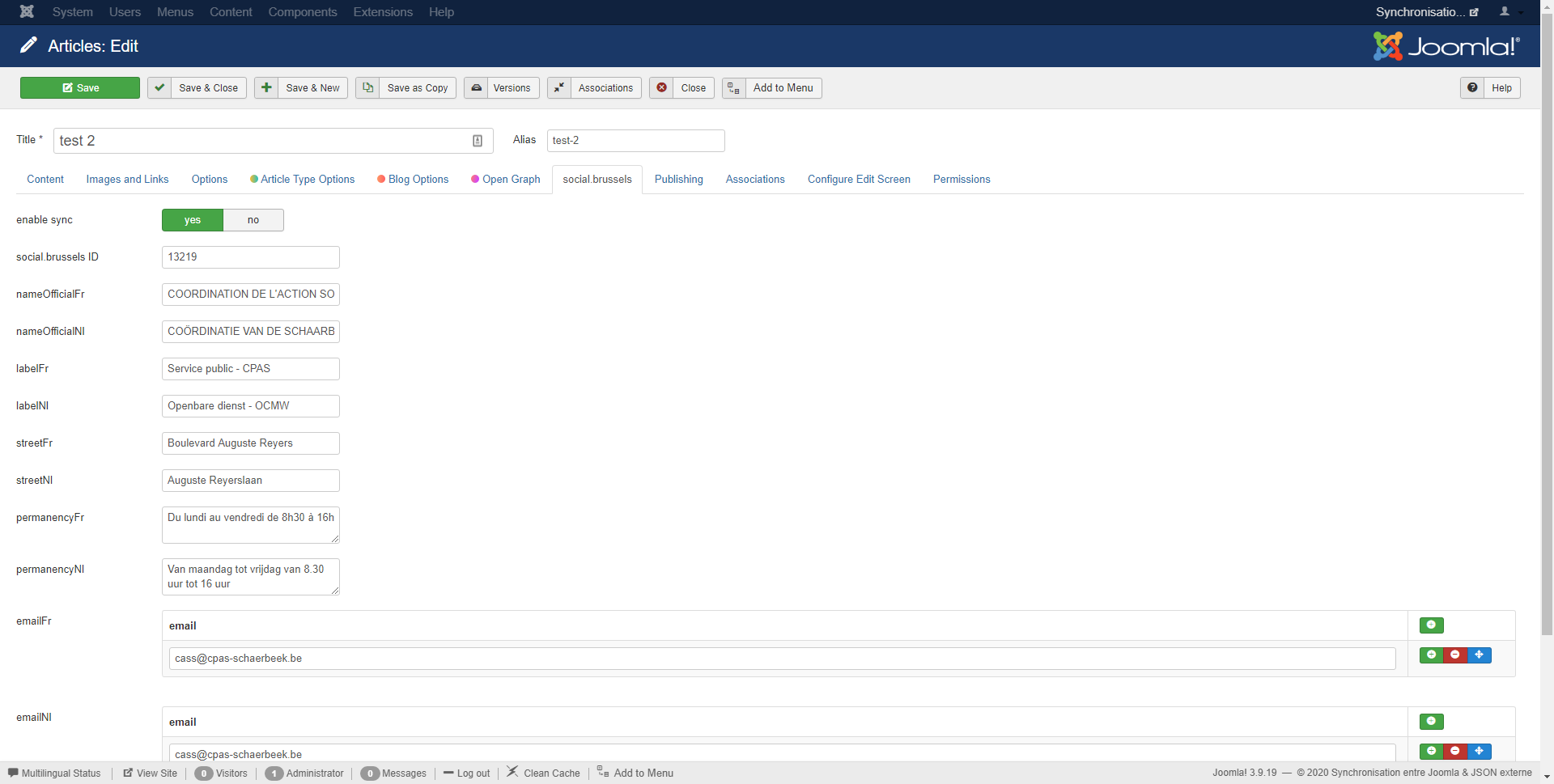
Voici une capture d'écran avant/après de l'édition d'un article dans l'interface d'administration : au départ tous les champs sont vides et après la synchronisation ils sont tous remplis.
{tab NL}
Toelichtingen (NB : dit is een automatische vertaling)
Preambule: de bladen kunnen uiteraard worden opgemaakt volgens het gewenste grafische charter. Aangezien dit een demo is, is er hier geen opmaak.
Deze demo-site illustreert de automatische synchronisatie tussen
- gegevens op een site van derden beschikbaar in json-indeling. Voorbeeld:
- social.brussels/rest/organization/13219 voor de json-versie
- social.brussels/organization/13219 voor de klassieke webversie
- en een Joomla-site die twee native functies gebruikt
- Meertalig
- Aangepaste velden
Deze synchronisatie wordt gedaan met behulp van een lichtgewicht plug-in die wordt geactiveerd
- automatisch , volgens het interval dat is geconfigureerd in de plug-in-parameters (meestal elke X dagen op het aangegeven tijdstip), zelfs zonder afhankelijk te zijn van een CRON-taak
- handmatig bij het opslaan van de plugin-parameters (of ze nu zijn gewijzigd of niet)
Aan de artikelen van de betreffende Categorieën zijn meerdere Custom Fields toegekend
- een aangepast veld "inschakelen synchronisatie" waar u vrij kunt kiezen of de gegevens van het genoemde item moeten worden gesynchroniseerd of niet
- een Custom Field "social.brussels ID" dat de identificatie van de organisatie op de site social.brussels aangeeft
- en alle aangepaste velden
- u wilt synchroniseren met social.brussels
- of onafhankelijk
Joomla's native meertalige content management is ook van toepassing op Custom Fields. Met andere woorden
- als een taal is toegewezen aan een bepaald aangepast veld, wordt deze alleen op de site weergegeven als die taal is geselecteerd
- anders verschijnt het in alle talen
Hier is een korte demonstratievideo waarin we dat zien
- we creëren een blanco artikel, waarin we enkel de ID (identifier) van de instelling uit social.brussels vermelden
- synchronisatie wordt handmatig geactiveerd (die ook automatisch wordt geactiveerd met het gewenste interval)
- we merken zowel op de site (front-end) als in de administratie (back-end) op dat het formulier volledig automatisch is ingevuld
Hier is een screenshot voor / na het bewerken van een artikel in de administratie-interface: aanvankelijk zijn alle velden leeg en na synchronisatie zijn ze allemaal gevuld.
{tab EN}
Explanations (NB : this is an automatic translation)
Preamble: the sheets can of course be formatted according to the desired graphic charter. As this is a demo, there is no formatting here.
This demo site illustrates the automatic synchronization between
- data on a third-party site available in json format. Example:
- social.brussels/rest/organization/13219 for the json version
- social.brussels/organization/13219 for the classic web version
- and a Joomla site using two native features
- Multilingual
- Custom Fields
This synchronization is done using a lightweight plugin that is triggered
- automatically , according to the interval configured in the plugin parameters (typically every X days at the time indicated), without even depending on a CRON task
- manually when saving the plugin parameters (whether they have been changed or not)
Several Custom Fields are assigned to the articles of the Categories concerned
- a Custom Field "enable sync" where you can freely choose whether the data of said item should be synchronized or not
- a Custom Field "social.brussels ID" which indicates the identifier of the organization on the social.brussels site
- and all Custom Fields
- you want to synchronize with social.brussels
- or independent
Joomla's native multilingual content management also applies to Custom Fields. In other words
- if a language is assigned to a given Custom Field, it will only appear on the site when that language is selected
- otherwise it will appear in all languages
Here is a short demonstration video where we see that
- we create a blank article, where we only indicate the ID (identifier) of the institution coming from social.brussels
- synchronization is triggered manually (which is also triggered automatically at the desired interval)
- we note both on the site (front-end) and in the administration (back-end) that the form has been fully completed automatically
Here is a screenshot before / after editing an article in the administration interface: initially all fields are empty and after synchronization they are all filled.
{/tabs}